Monarch: Budget & Track Money
- 4.8
- Rating
- 500.00K
- Installs
- Free
- Price

 Analysis by App-foxy
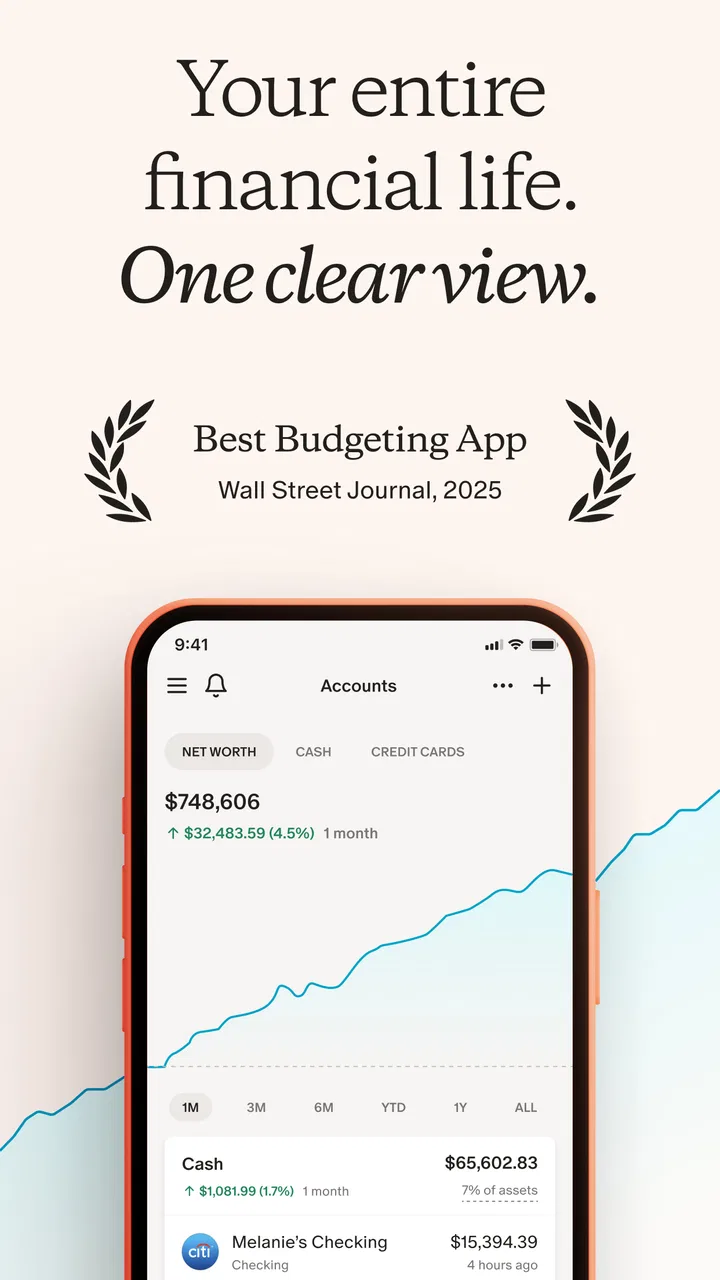
Managing money on a phone sounds simple until the useful information is spread across bank accounts, cards, investments, bills, and savings plans. Monarch: Budget & Track Money is built around bringing that picture together, then turning it into something I can actually review. I see it as a finance app for people who want a broader view than a basic spending diary, especially if net worth and investments matter alongside everyday purchases.
After using it, my impression is that the app works best as a regular financial check-in rather than a tool I open only when I am about to spend. Its value depends on having current information available, so connectivity is not a minor detail. When the app can reach the services connected to my financial life, it feels like a convenient control panel. When a connection is slow, interrupted, or needs attention, the experience becomes more about checking the state of the data than making a quick decision.
How Monarch fits into a connected financial routine
I treat a connected money dashboard as one part of a larger routine, not as the final authority on every balance. In this section, I focus on how I would move from a quick overview to a decision, then verify anything time-sensitive where it originates. That handoff is useful because it keeps a convenient summary from becoming a substitute for careful checking.
You May Also Like

 Blood Strike: 2.5 Anniversary
Blood Strike’s Loadouts Turn Every Drop Into a Tactical Gamble
A close look at Blood Strike’s custom loadouts: how fast access to signature weapons reshapes its battle royale rhythm, rewards preparation, and narrows the gap between fights.

 Pandora - Music & Podcasts
Pandora’s Music Is Easy to Start, but Harder to Recover
Pandora’s strength is its low-effort path from a seed to a station. Its weak spot is how much confidence it asks you to place in connection, setup, and quiet recovery.

 8 Ball Pool
 Is Built on Rivalries, Rematches, and Routine
A close look at the rivalries, rematches, shared routines, and unanswered safety questions that turn a quick pool match into a persistent mobile community.

 Samsung Music
’s Quiet Strength Is Playing What You Already Own
Its reach comes less from spectacle than from dependable access to a personal library. That simplicity is both the app’s strongest retention engine and its ceiling.

 AccuWeather: Weather Radar
AccuWeather Review: A Quick, Clear Forecast for Everyday Decisions
For everyday plans, the best forecast is the one you can understand quickly. AccuWeather makes rain timing, radar, and local conditions easy to act on, with a few trade-offs.

 Hill Climb Racing
Why Hill Climb Racing Still Turns Crashes Into One More Run
A tiny car, a bumpy hill and one more upgrade: Hill Climb Racing keeps resurfacing because its simple chaos makes every near-miss feel personal.
More From Our News Desk



A wider view than a simple expense tracker
The first thing that separates this app from a conventional manual budget is its scope. A simple expense tracker asks me to record what I spend. Monarch is aimed at a fuller financial picture: spending, net worth, investments, and goals sit within the same general experience. That makes it more appealing to someone who wants to understand how daily choices affect longer-term progress.
I would not describe it as a lightweight calculator for occasional purchases. Its usefulness grows when I have several parts of my financial life to follow. Someone with one checking account and a very simple routine may find a spreadsheet quicker. Someone with multiple accounts, recurring obligations, and investments has more reason to appreciate a central view.
The developer is Monarch Money, and the app belongs firmly in the finance category. It is free to install, with in-app purchases ranging from $14.99 to $99.99 per item. That pricing detail matters because the free download is not the same thing as a promise that every part of the experience is permanently available without payment. I would check the current purchase choices inside the app before building a workflow around features I consider essential.
What connectivity changes during setup
The most important network-dependent moment comes when I want the app to reflect information held elsewhere. A connected finance dashboard is only useful if the relevant account information can be reached and refreshed. This creates a different rhythm from a locally maintained budget: instead of entering every transaction by hand, I spend more time making sure the connections behind the dashboard are healthy.
That trade-off is worth understanding before installing it. The convenience is not magic. It relies on communication between the app and the financial services I want to monitor. A strong connection can make the process feel almost invisible, while a weak connection can turn a quick review into a pause, a retry, or a later return to the app.
I also prefer to treat the first setup as a deliberate session rather than something to rush while travelling. I would connect only the accounts I genuinely want in the same overview, inspect how the resulting information is organized, and then decide whether the arrangement helps me. Adding everything immediately can make the dashboard feel comprehensive, but it can also make early corrections more confusing if something is categorized or displayed in a way I do not expect.
Using it on the move
On a phone, the strongest use case is a short review between ordinary tasks. I can imagine checking spending before making a large purchase, looking at progress toward a goal while commuting, or reviewing whether a recent payment has appeared before moving money elsewhere. These are useful moments because the phone is already with me and the information is presented in a more focused way than a desktop spreadsheet.
However, mobile convenience should not be confused with guaranteed availability in every situation. If I am in a place with unreliable service, I would not depend on the app as my only source of financial information. I would plan important decisions around a moment when the network is dependable, particularly if the decision depends on recently updated account activity.
This is also why I would avoid using a rushed glance as the sole basis for a complicated financial decision. A phone screen encourages quick interpretation. A dashboard can show a useful summary, but I still need to consider pending activity, timing, and the difference between a recent transaction and a fully settled balance. The app can help me see the pattern; it does not remove the need to think about the underlying situation.
A realistic everyday scenario
Suppose I am preparing for a month in which an annual bill, a regular card payment, and an investment contribution are all due close together. I could open Monarch before making an extra purchase and review how those commitments affect my broader position. If the relevant information is current, that is more useful than checking one account in isolation, because the decision involves cash flow as well as longer-term goals.
If the network connection fails at that moment, I would not keep tapping refresh and assume the screen is becoming more accurate. I would note what I already know, wait until I can reconnect reliably, and then verify the figures before acting. That small habit is one of the practical lessons of a connected finance app: fresh information is valuable only when I know it has actually refreshed.
Recovery when a connection goes wrong
Connectivity problems are frustrating in any app, but they feel more serious around money. A delayed view can make me wonder whether a transaction is missing, whether a balance is old, or whether the problem is limited to one account. My preferred recovery routine is simple: stop repeating the same action, check the network, reopen the app later, and compare the updated view with the source account when the decision is important.
I would also keep my expectations realistic about timing. A connected dashboard may not mirror every financial event at the exact moment it happens. Transactions can move through different stages, and a connection issue can make that timing less obvious. Monarch is most useful when I use it for trends, planning, and regular oversight, while treating urgent balance confirmation as something I verify carefully.
That does not make the app ineffective. It simply defines its role. I see it as a layer for organizing and understanding my finances, not as a replacement for every direct interaction with a bank, card provider, or investment service. When something looks unusual, checking the original source is a sensible part of recovery rather than a failure of the app.
Data-conscious habits that improve the experience
A connected finance app encourages me to think about data in two ways: the information I choose to bring together and the network conditions used to keep that view current. I would start with a narrow, useful setup instead of connecting accounts just because I can. For example, I might begin with the everyday accounts that affect my monthly decisions, learn how the overview works, and expand only if the additional information genuinely improves planning.
This approach has a practical advantage. A smaller starting set is easier to audit. If a figure looks unexpected, I have fewer places to inspect and a clearer understanding of what should be included. It also helps me decide whether the app’s organization matches the way I think about money before I commit to a more complete financial picture.
On mobile data, I would use the app when I have a stable connection for planned reviews and avoid repeatedly refreshing during a weak signal. I would not invent a data-saving promise for the app, and I would not assume that a screen showing old information is equivalent to a current account balance. The safest habit is to distinguish between reviewing a known snapshot and waiting for a new update.
Privacy also deserves a practical, non-dramatic approach. Bringing financial information into one place can be convenient, but it increases the importance of securing the phone and being selective about what I connect. I would use the device protections already available to me, avoid reviewing sensitive details on a public screen, and remove connections I no longer need. Those habits are useful regardless of whether the app is being used at home or over a mobile network.
How it compares with familiar alternatives
Compared with a spreadsheet, Monarch offers a more purpose-built way to look at spending, net worth, investments, and goals together. A spreadsheet gives me maximum control and can work without depending on an app’s structure, but it also asks me to maintain more of the system myself. I would choose the spreadsheet when I want unusual calculations or a highly customized model. I would choose Monarch when I want a ready-made financial overview that I can revisit from my phone.
Compared with a basic expense tracker, the difference is breadth. A manual tracker can be excellent for building awareness of small purchases and may feel faster for someone who wants only a daily spending log. Monarch makes more sense when I want spending to sit beside a wider view of financial progress. The extra scope can be helpful, but it may also feel like unnecessary complexity to a person who prefers entering everything manually and keeping the system very small.
Compared with checking each bank or investment app separately, Monarch reduces the need to jump between screens during a routine review. That convenience is especially noticeable when I am trying to understand the relationship between accounts rather than inspect one transaction. The trade-off is that a single dashboard introduces another layer to interpret and another connection to maintain. For a precise, immediate confirmation, I would still go to the original service.
Who will get the most from it
I would recommend Monarch to someone who wants a regular financial overview and is willing to spend time setting up a connected system. It suits people who think in terms of monthly spending, overall net worth, investment progress, and goals rather than only asking, “How much did I spend today?” It is also a good fit for someone who wants to make financial reviews part of a routine instead of relying on memory.
It may be particularly useful for households or individuals whose money is spread across several places. The benefit is not just seeing more numbers; it is being able to review them in one planning conversation with myself. Before a major purchase, a change in savings, or a month with unusual expenses, that broader context can prevent me from focusing too narrowly on one account.
I would be more cautious recommending it to someone who has unreliable internet access, dislikes connecting financial services, or wants a completely manual system. It is also not my first choice for a person who needs a specialized investment terminal or highly detailed professional analysis. The app’s strength is the connected overview, not replacing every specialized financial tool.
Details worth knowing before installing
The app has an Everyone content rating, which makes it broadly approachable from an age-classification perspective. It was released on January 21, 2021, and the current version is 2.0.77. It requires Android 7.0 or later, so anyone using an older Android device should check compatibility before planning a move to it. Those details are easy to overlook, but they matter when the phone is older or shared within a household.
Its public reception is strong, with a 4.7 average from around 19 thousand ratings and roughly 1.9 thousand written reviews. The app has passed 500 thousand installs, which suggests that it has found a substantial audience without making popularity the only reason to try it. I would still judge it by my own tolerance for connected services and by whether its broader view matches my financial habits.
The purchase range also deserves attention before I recommend it without qualification. Since the app is free to install but includes paid items from $14.99 to $99.99, I would treat the initial download as an opportunity to evaluate the workflow, not as proof that the complete experience costs nothing. If a paid option becomes necessary for the way I want to use it, I would compare that cost with the time saved over maintaining a spreadsheet or several separate apps.
My connectivity verdict
Monarch: Budget & Track Money is most convincing when I use it as a connected financial cockpit: open it during a reliable network session, review the bigger picture, notice changes, and make a calmer plan. Its focus on spending, net worth, investments, and goals gives it more ambition than a simple expense notebook, and the mobile format makes regular check-ins practical.
At the same time, the connected design sets clear boundaries. I would not rely on it blindly during a service interruption, assume every displayed figure is current without checking its update state, or abandon the original financial services when a transaction needs urgent confirmation. The best experience comes from combining its overview with sensible verification habits.
My final recommendation is therefore specific: choose it if you want one place to organize a broad financial picture and can work comfortably with network-dependent updates. Skip it in favor of a manual tracker or spreadsheet if simplicity, local control, or independence from account connections matters more to you. For my own routine, the app earns its place when it turns scattered financial information into a review I can actually complete, rather than another screen I check without making a decision.
FAQs for Monarch: Budget & Track Money
01What features does Monarch: Budget & Track Money offer?
Monarch provides a comprehensive suite of financial tools to help users manage their budget effectively. It includes automatic expense tracking, customizable budgeting tools, financial goal setting, and insightful reports. The app also integrates with various financial institutions, offering a centralized hub to monitor all your accounts in one place.
02Is Monarch: Budget & Track Money secure to use?
Yes, Monarch prioritizes user security by employing bank-level encryption to protect your financial data. It uses secure connections to your financial institutions and ensures that your personal information is never sold or shared without your consent. Regular updates are also implemented to maintain robust security protocols.
03Can Monarch sync with my existing bank accounts?
Absolutely. Monarch supports syncing with a wide range of banks and financial institutions, allowing for automatic updates of your transactions and account balances. This feature ensures that you always have the most current financial information at your fingertips, reducing the need for manual data entry.
04Is there a cost associated with using Monarch: Budget & Track Money?
Monarch offers both free and premium subscription plans. The free version includes basic budgeting and tracking features, while the premium plan provides advanced tools like detailed financial reports, personalized advice, and priority customer support. The subscription fee for the premium plan is charged monthly or annually, depending on your preference.
05How user-friendly is the Monarch app for beginners?
Monarch is designed with a user-friendly interface, making it accessible even for those new to budgeting apps. The intuitive design guides users through setup and daily use, with helpful tutorials and customer support available to assist with any questions. Its simplicity without sacrificing functionality is a key strength for beginners.
Pros
- User-friendly interface for easy navigation.
- Comprehensive budgeting tools included.
- Real-time syncing with bank accounts.
- Customizable categories for expenses.
- Secure data with top-notch encryption.
Cons
- Limited features in the free version.
- No cryptocurrency tracking available.
- Occasional syncing delays reported.
- Subscription can be pricey for some.
- Some minor bugs in the Android app.

Monarch: Budget & Track Money
Gallery